Pages

Showing posts with label Nokia. Show all posts

Thursday, August 1, 2013

Nokia Beta Labs just released "Lumia Storage Check"

Lumia Storage Check
Lumia Storage Check


Nokia Beta Labs just released "Lumia Storage Check" beta application for Nokia Lumia with Windows Phone 8.
This beta version is an update version of "Lumia Storage Check" that comes with new firmware update for Nokia Lumia 920, 820 and 620. There are some new features on this beta version including "Manage Maps", "Video shown separately", etc.
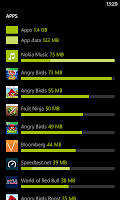
  • "Lumia Storage Check beta can be used to show a detailed breakdown of the phone memory usage and do something about it. The app shows you an overview and details on the second page."
Features
  • Apps - with app data included and sorted by size on further detail page
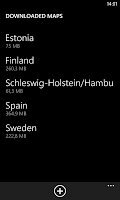
  • NEW: Maps - you can now manage maps from here and store them on SD card
  • Temporary files - temp files created by the system, some of which can be deleted with the
  • Photos Storage Information
  • Music Storage Information
  • NEW: Videos shown separately
  • Office docs (including OneNote notebooks, copies of docs accessed from SharePoint and SkyDrive)
  • Email+contacts Storage Information
  • Ringtones Storage Information
  • System (fixed, usually 1.9 GB)
  • Other (this includes stuff that user has little control over)
Lumia Storage Check     Lumia Storage Check     Lumia Storage Check


Minimum firmware required 
  1. Lumia 820 or Lumia 920: 1232.5957.1308.0000 and higher
  2. Lumia 920T: 2041.0009.1308.1002 and higher
  3. Lumia 520, Lumia 620 or Lumia 720: 1030.6407.1308.0000 and higher
Lumia Storage Check        Lumia Storage Check

Note
  • The storage check app here in Nokia Beta Labs is offered as a stand-alone app (not under settings) 
Download

Tips:Don’t Forget To Comment Below On The Comment Box, Because Your Feedback Will Help Us To Fix If Any Bug Stay Here. Thanks.
Nokia Beta Labs just released "Lumia Storage Check"
Rating: 910109 user reviews.

Sunday, July 28, 2013

How To Check & Download Software Update on Your Nokia Lumia Windows 8 Phone

Nokia Update
Nokia Update


Software update for Nokia Lumia with Windows Phone 8 will brings some new features, enhancements, bug fixes, performances improvement and more.
To check, download and install the software update for your Nokia Lumia with Windows Phone 8, you can check & download the update directly from your Nokia Lumia Windows Phone 8.
In this post, we will inform you about "how to" check and download the software update for your Nokia Lumia with Windows Phone 8.

Step 1: Preparation
  1. Make sure date & time are set correctly on your Nokia Lumia Windows Phone 8
  2. Make sure your remaining battery life is more than 50%
  3. Make sure that there are no download & installation progress on Windows Phone Store
  4. Make sure you are connected to WiFi network with sufficient speed
  5. Make sure you are already close all applications
Step 2: Download & Install
  1. Go to Setting > phone update
  2. Tap "check for updates" to check the update is available or not
  3. If the update is available, Continue to update/downloading the update
  4. The download progress will start
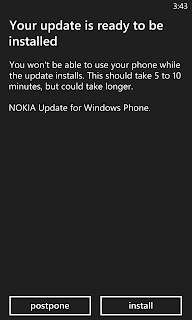
  5. After done with download progress, Tap "install" and your Nokia Lumia will restart to start the update process
  6. The "gear" image will appear, just wait until the process is finish
  7. After that, there are some remaining steps like "moving your data", etc. Just follow the steps
  8. Done, Your Nokia Lumia Windows Phone 8 is up to date with current Software version

How To Check & Download Software Update on Your Nokia Lumia Windows 8 Phone
Rating: 910109 user reviews.

Download "Camera360" For Nokia Lumia Windows Phone 8

"Camera360"
Camera360


Everyone know who use facebook twitter myspace & mostly iPhone user know that "Camera360", is a popular photo sharing application on iOS and Android & now available for Nokia Lumia with Windows Phone 8.
With creative compass feature completed by 6 shooting themes, live effects, 6 classy frames, etc, "Camera360" is one of the best lens application for Nokia Lumia with Windows Phone 8.


  • Camera360 for WP8 is developed by Camera360 group and now it is the most worth expecting camera app on Windows Phone 8. Camera360 for WP8 comes out in a creative way. With COMPASS inspired by that of SLR, natural effects, smart UE, powerful features, and ‘Less is more’ concept existing in each details, Camera360 for WP8 aims at being the best camera app for every Window Phone 8 addictive.
Apps Features:
  1. Creative COMPASS with 6 shooting themes, offers selected effects for each photographing theme. (Auto, Portrait, Scenery, Food, Night, Microspur)
  2. Numerous effects & Live effects, you can see effect on photo in real time.
  3. Photo re-edit makes photo distinguishing.
  4. Photo diary sorts photos by taken date. It is easy to browse or search for a certain photo.
  5. 6 classy frames to decorate your photo makes photo more special.
  6. Easily sharing photo to multi-sites brings true happiness of share. 
Version
  • Camera360 v 0.9.0.0
Compatibility
  • Nokia Lumia Windows Phone 8
    • Nokia Lumia 920, 820, 720, 620, etc.
Price
  • Free
Download
 Nokia Camera360     Nokia Camera360     Nokia Camera360 
Nokia Camera360     Nokia Camera360     Nokia Camera360
Download "Camera360" For Nokia Lumia Windows Phone 8
Rating: 910109 user reviews.

Saturday, July 27, 2013

Nokia Lumia 920, 820 and 920 Update Via Over The Air Update

Nokia Lumia 920, 820 and 920 - You may live anywhere but if you want to get a software update into version 1232.5957.1308.00xx  for Nokia Lumia 920 and Nokia Lumia 820, for Nokia Lumia 620 the version is 1030.6407.1308.00xx.
You can get the software update directly from your Nokia Lumia 920, 820 and 620 via Over the Air (OTA) update.


Software updates for Nokia Lumia 920 and Nokia Lumia 820 will bring:
  • Improved automatic display brightness adjustment
  • Fix for intermittent screen blanking during a call
  • Further performance and stability improvements
For Nokia Lumia 620 will bring:
  • Improved touch screen functions, including corrections in multi-touch actions
  • Better voice quality with Bluetooth headsets that support echo/noise suppression
  • Enhanced camera performance with corrected exposure when flash is used in bright light conditions
  • Various improvements to system stability, performance, and usability
Nokia Update Nokia Update

Nokia Update Nokia Update

How To Check & Download
  • To check and download the update for your Nokia Lumia 920/820/620. Simply check from "phone update" directly from your Nokia Lumia 920/820/620.


Nokia Lumia 920, 820 and 920 Update Via Over The Air Update
Rating: 910109 user reviews.

Friday, July 26, 2013

Download Latest Nokia Pc Suite 3.6.11 Beta For Windows Phone 8 Lumia

Nokia New Pc Suit 3.6.11


Nokia released the latest Nokia Suite 3.6.11 Beta for Windows Operating System. This new version is now with SkyDrive feature.
The SkyDrive feature will help you to copy your contacts, calender, photos from your Nokia  devices to SkyDrive and transfer it to your brand new Nokia Lumia Windows Phone.


How To Copy your content to Nokia Lumia
Nokia New Pc Suit 3.6.11
Nokia Software Update
  • If the update version (Nokia Suite 3.6.11 Beta) is Available, download and install
  • Open the Nokia Suite 3.6.11 Beta
  • Connect your Nokia Devices
  • Click "Copy Content to Nokia Lumia"
  • Follow The steps
Nokia New Pc Suit 3.6.11
Nokia Store

Nokia New Pc Suit 3.6.11
Nokia New Pc Suit + SkyDrive
  • Login with your Windows Account
Nokia New Pc Suit 3.6.11
Nokia New Pc Suit
  • Select content that you want to copy, and click copy
Nokia New Pc Suit 3.6.11
Nokia New Pc Suit
  • Wait until all the process finish
  • After all the process finish, sign in your Microsoft account with your brand new Nokia Lumia
  • Wait until synchronization process finish
  • Your content is now available on your Brand new Nokia Lumia
Download Latest Nokia Pc Suite 3.6.11 Beta For Windows Phone 8 Lumia
Rating: 910109 user reviews.

App For Nokia Lumia Windows Phone How To Make a Conference Call with "Nokia Conference Beta"

Nokia Conference Beta


Nokia Beta Labs team release "Nokia Conference Beta" application for Nokia Lumia with Windows Phone 7.x and 8.
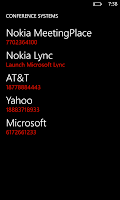
"Nokia Conference Beta" will make you easier to make frequent conference calls. If your company use Microsoft Lync for conference call. This application will launch Microsoft Lync to connect you to a conference call.

  • " Nokia Conference makes it very easy to dial into conference calls. No more switching to the calendar app, remembering the ID/PIN codes, getting the right access number, switching to the phone app, making the call, and entering all the codes. Instead just hit one button or even join via voice command. It's very handy for anyone that makes frequent conference calls, as so many of us do. 
  • To join via voice, hold down the Windows key and speak the command "conference join". We'll automatically figure out which meeting is going on currently or about to start, say it back to you for confirmation, and connect you. If your company uses Lync, we'll launch the Lync app to connect you. "
Nokia Conference Beta    Nokia Conference Beta    Nokia Conference Beta
Version
  • Nokia Conference Beta v 0.94.8.1
Compatibility
  • Nokia Lumia Windows Phone 7.x and 8
Nokia Conference Beta Nokia Conference Beta

Price
  • Free
Support Page
Click The Link Below To Download


Tips:Don’t Forget To Comment Below On The Comment Box, Because Your Feedback Will Help Us To Fix If Any Bug Stay Here. Thanks.
App For Nokia Lumia Windows Phone How To Make a Conference Call with "Nokia Conference Beta"
Rating: 910109 user reviews.

Wednesday, July 24, 2013

Apps For Nokia Lumia Windows Phone 8 Get Update Version "Nokia Xpress", "Asphalt 7 Heat" and "Speedtest.net

Nokia Xpress Browser
Nokia Xpress World


You Nokia lover know prior about the 2 Popular applications and 1 popular game from Gameloft receive update version, there are "Nokia Xpress" updated to version 1.0.19, "Speedtest.net" updated to version 1.1.0 and "Asphalt 7 Heat" updated to version 1.1.0.
Get the updates now from Windows Phone Store to get performance improvements and several new features.

Nokia Xpress Browser
  • Version
    • 1.0.19.0
  • Change Log
    • Updates to privacy policy
    • 512MB devices now supported, including Lumia 620 and Lumia 520
    • Hindi translation for any web page
  • Compatibility
    • Nokia Lumia Windows Phone 8
      • Nokia Lumia 920, 820, 720, 620, 520
Speedtest.net
  • Version
    • 1.1.0
  • Change Log
    • Fixed bug that caused cell network tests to be seen as Wi-Fi tests
    • Added option to remove ads
  • Compatibility
    • Nokia Lumia Windows Phone 8
      • Nokia Lumia 920, 820, 720, 620, 520

Asphalt 7 Heat
  • Version
    • 1.1.0
  • Change Log
    • Reduced File Size
    • Now Support Nokia Lumia Windows Phone 8 with 512 MB.
  • Compatibility
    • Nokia Lumia Windows Phone 8
      • Nokia Lumia 920, 820, 720, 620, 520

Tips:Don’t Forget To Comment Below On The Comment Box, Because Your Feedback Will Help Us To Fix If Any Bug Stay Here. Thanks.
Apps For Nokia Lumia Windows Phone 8 Get Update Version "Nokia Xpress", "Asphalt 7 Heat" and "Speedtest.net
Rating: 910109 user reviews.

Saturday, July 20, 2013

Move Your Smartphone Contents to Nokia Lumia Through "Welcome Home" Available For Windows/Mac-OS

Download "Welcome Home"


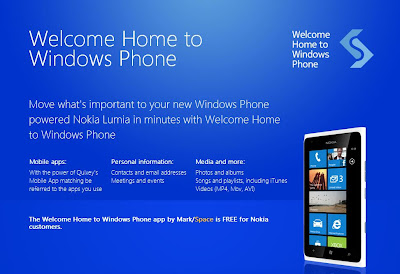
Nokia release a new tool for migrating your Smartphones contents to your Nokia Lumia called "Welcome Home" to Windows Phone. 31 August 2012,
This tool / application is free for Nokia Lumia owners and available for Windows & MAC OSX.


"Welcome Home" allow you to move your Smartphone contents like contacts, calendars, pictures, songs and videos from your old iPhone, Android and Blackberry devices to your brand new Nokia Lumia Windows Phone.
  • Welcome Home is a comprehensive one-time set-up tool, offering customers who are transitioning from a BlackBerry, iPhone or Android device, a fast and easy way to set-up a Nokia Lumia phone with their info and media. Welcome Home also leverages Quixey’s app search technology that sees the apps people already own and presents the app if it has a Windows Phone version. For the apps that don’t have an exact match, users are recommended similar apps for Windows Phone.

Download "Welcome Home
Screenshot-1
How to use this Application?
  • Step 1
    • Download "Welcome Home" - Windows or MAC OSX
    • Install it
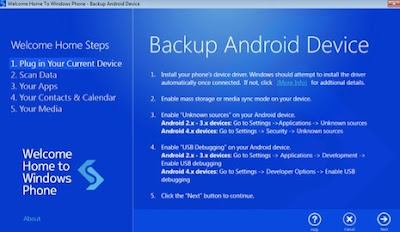
    • Launch the application and simply plug in your smartphone and wait until all the drivers are installed
Download "Welcome Home
Screenshot-2
    • Click "next" to begin the backup
Download "Welcome Home
Screenshot-3
  • Step 2
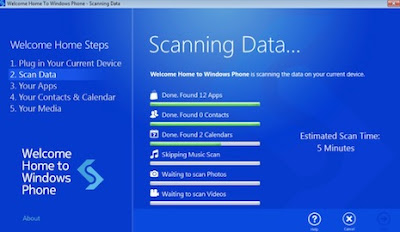
    • Scanning your contents started and wait until all the process completed
Download "Welcome Home
Screenshot-3
Download "Welcome Home
Screenshot-4
  • Step 3
    • See your apps recommendations and install the apps using the QR code.  To do this on your Lumia, from the homescreen, hit the magnifying glass in the lower right of the screen and touch the icon that looks like an eyeball. The code will scan and you can touch the link to be taken to the apps’ page in Marketplace.
Download "Welcome Home
Screenshot-5
  • Step 4
    • Enter your Live ID Account and click "Sign In" to continue the process
Download "Welcome Home
Screenshot-6
  • Step 5
    • All the contents will be transferred to your brand new Nokia Lumia
Download "Welcome Home
Screenshot-7
Post Source

Tips:Don’t Forget To Comment Below On The Comment Box, Because Your Feedback Will Help Us To Fix If Any Bug Stay Here. Thanks
Move Your Smartphone Contents to Nokia Lumia Through "Welcome Home" Available For Windows/Mac-OS
Rating: 910109 user reviews.

Friday, July 19, 2013

Nokia Lumia Windows Phone 8 Firmware Update Easily Through Zune Software

Nokia Lumia
Nokia Lumia Phone
Hey buddy’s hope you all will be happy to read the post, Here is a simple guide to update your Nokia Lumia Windows Phone by using Zune application from Microsoft.

The updating is simple as on Nokia Suite. Just only need a few step to updating your Nokia Lumia Windows Phone software.
All you need is Computer, Zune software, Nokia Windows Phone and also The USB Cable.


What you need to do before updating

  1. Download & Install Zune Software 
  2. Make sure that your date & time on your phone is correct.
  3. Make sure you are already fully charged your phone before updating.
  4. Make some room on your phone for the update. 
  5. If necessary, remove a few unwanted applications or other large items. To see how much free space you have on your phone, select Start, then flick left to the Applications list, choose Settings > About and look at the number to the right of Available storage.
  6. Free up space on your computer as you will need some room to download the software update, to save a backup of your existing phone software and settings and possibly to synchronise media files from your phone to your computer.

Lumia Update
Update Your Phone

How to update your Nokia Lumia Windows Phone?
  1. Download & Install the Zune software (Windows) or Windows Phone 7 Connector (Mac OS) on your computer.
  2. Connect your phone to your computer, using the USB cable.
  3. The Zune software will automatically run after your phone connected with your Computer. If not, run manually.
  4. In the Zune software, click Update Now (in Windows Phone 7 Connector for Mac, click Install Updates). 
  5. Ready to Update
  6. Make sure you keep your phone connected to your computer until you see a notification that the update is complete.
Tips:Don’t Forget To Comment Below On The Comment Box, Because Your Feedback Will Help Us To Fix If Any Bug Stay Here. Thanks
Nokia Lumia Windows Phone 8 Firmware Update Easily Through Zune Software
Rating: 910109 user reviews.