Pages

Showing posts with label Through. Show all posts

Thursday, August 15, 2013

How To Jailbreak iOS 6.1.2 Through Evasi0n 1.5.3

Jailbreak iOS 6.1.2 with evasi0n 1.5.3

Evasion 1.5.3 was just released with support for the recently released iOS 6.1.2, and we’ve got the details on how to use it to jailbreak your iDevice of choice. Although iOS 6.1.2 doesn’t bring any new features to the table, there is a bug fix that makes the upgrade worth it.

Take a look inside as we show you how to jailbreak iOS 6.1.2 with evasi0n 1.5.3. This tutorial is for the Mac, but the same principal applies across all computing platforms.

Follow The Instruction Below How to jailbreak iOS 6.1.2?

Notes: As always, before we get started, there are a few things to keep in mind here. First, read our jailbreak preparation post. It covers a few vital ideas that should make your life easier when it comes to managing and maintaining your jailbreak.

Be sure that your device’s passcode lock is disabled. The passcode lock can interfere with the jailbreak process. Also, make sure that when you upgraded to iOS 6.1.2, it was done, not via an OTA update, but via an iTunes update. While it’s possible that it will work, OTA updates have caused known problems in the past with regard to jailbreaks, it’s best to just play it safe. Okay, let’s get started!

Step 1: First you need to Download Evasi0n 1.5.3, Going to Here. The downloads are available for Mac, Windows, or Linux.

Step 2: Save the evasi0n app to your desktop, and run it.

Step 3: Connect your iOS device to evasi0n, and ensure that evasi0n detects your device. Evasi0n should work with any iOS 6 firmware from iOS 6.0 to iOS 6.1.2. In this case, you will be using iOS 6.1.2.

Step 4: Click the jailbreak button, and the jailbreak process will begin. Be patient, as this takes a while. You will notice your device reboot several times throughout the entire process. The main thing is just to be patient.

Step 5: Eventually, evasi0n will ask you to unlock your device, and tap the Jailbreak icon on your Home screen once. Follow these instructions, ensuring that you tap the icon only one time, and then leave the device alone and let it continue.

Step 6: The evasi0n app will complete its course, and you will be able to click the Exit button. The iOS device, however, still needs to finish up a few additional steps, so again, be patient and don’t touch your device.

Step 7: Eventually, the jailbreak will finish, and you can unlock your iOS device, and open the Cydia app on your Home screen. Cydia will need to initialize, which takes about 1 to 2 minutes. After the initialization is complete, the device will respring again.

Step 8: Reopen Cydia, select Hacker, and begin enjoying your newly jailbroken iOS device running iOS 6.1.2.

Remember, this is an untethered jailbreak, so you can feel free to reboot your device at will. Also, remember to take the necesarry steps to protect your jailbreak. you can do so by reading our post that describes how to protect device.

Be sure to let me know what you think in the comment section below if you have any questions, comments, or concerns regarding this latest update to evasi0n.
How To Jailbreak iOS 6.1.2 Through Evasi0n 1.5.3
Rating: 910109 user reviews.
Title Post: How To Jailbreak iOS 6.1.2 Through Evasi0n 1.5.3 Updated at: 1:53 AM

Saturday, August 10, 2013

Download Nokia-PC-Suite 7.1 Through Direct Link

Nokia-PC-Suite 7.1
Nokia-PC-Suite 7.1


You can Use Nokia PC Suite to move your Nokia phone content between the phone and the computer, and you may download apps or you can update the latest phone software. 

Always You can sync information between your phone to your desktop or laptop. Such as Office Outlook, create multimedia messages, or manage your phone’s calendar effortlessly on your computer. You can also connect your computer to the internet with the help of your phone.

If you want to get more information about compatible devices, see the list here. From Nokia Site.

Hey Do you have a Nokia Lumia phone?Windows PC users can sync music, videos, and pictures and get the latest phone updates with the Zune PC app. If you’re using an Apple Mac, download Windows Phone 7 Connector for Mac from the Mac App Store.

Click The Link Below To Download

Downloading Mirror Via Direct Link
Download Nokia-PC-Suite 7.1 Through Direct Link
Rating: 910109 user reviews.
Title Post: Download Nokia-PC-Suite 7.1 Through Direct Link Updated at: 7:20 PM

Friday, August 9, 2013

Hack Whatsapp Through Easy method

Hacked Whatsapp

Hack Whatsapp easy method

Hacking Trick-1:

Use Whatsapp With Someone Else's Number!!! This hack works by tricking the WhatsApp Verification Servers by sending a spoofed request for an authorization code
Intended for an alternative phone.
  1. Install WhatsApp on your device WhatsApp now starts a counter where it sends a
  2. verification message to its servers.
  3. Block the message service it can be blocked by changing the message center number or pushing the phone into Airplane mode.
  4. WhatsApp now offers an alternative method of verification Choose verify through SMS and fill in your email address. Once you click to send the SMS click cancel to terminate the call for authorization to the WhatsApp server.
  5. Now You have to do sms Spoofing You can do it using this App For Android Check your outbox and copy the message details into the spoofed application and send the spoofed verification. - Use this App and Send sms: To: +447900347295 From: +(Country code) (victims mobile number) Message: (your email address).
  6. 5. You will now receive messages intended for the spoofed number on your mobile device and you can communicate with people under the spoofed number and You have successfully hacked their whatsapp account !!

Hacking Trick-2:

How to get whats app free for 10 years:

..::Requirement ­s ::..
Iphone or Ipad 2.Android or Nokia Device with whatsapp

..:: Procedure ::..
  1. Remove whatsapp from your phone and take help from your friend who have owned Iphone or Ipad.
  2. Ask him to register whatsapp with your number.
  3. You will get an verification code on your phone, tell him verification code received on your number and enter it on his iPhone.
  4. After you have done all that steps whatsapp will start on your friend’s iPhone,just check account info and it will be updated to 2022.
  5. 5.Ask your friend to delete it and install the latest version on your phone and check its expiration date.

Hope you learned something from this Tutorial. Have FUN!
This Article Written By Tensed Boy Shimul
Hack Whatsapp Through Easy method
Rating: 910109 user reviews.
Title Post: Hack Whatsapp Through Easy method Updated at: 5:09 AM

Saturday, July 20, 2013

Move Your Smartphone Contents to Nokia Lumia Through "Welcome Home" Available For Windows/Mac-OS

Download "Welcome Home"


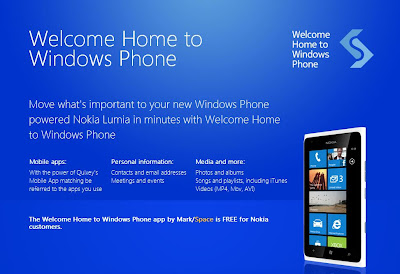
Nokia release a new tool for migrating your Smartphones contents to your Nokia Lumia called "Welcome Home" to Windows Phone. 31 August 2012,
This tool / application is free for Nokia Lumia owners and available for Windows & MAC OSX.


"Welcome Home" allow you to move your Smartphone contents like contacts, calendars, pictures, songs and videos from your old iPhone, Android and Blackberry devices to your brand new Nokia Lumia Windows Phone.
  • Welcome Home is a comprehensive one-time set-up tool, offering customers who are transitioning from a BlackBerry, iPhone or Android device, a fast and easy way to set-up a Nokia Lumia phone with their info and media. Welcome Home also leverages Quixey’s app search technology that sees the apps people already own and presents the app if it has a Windows Phone version. For the apps that don’t have an exact match, users are recommended similar apps for Windows Phone.

Download "Welcome Home
Screenshot-1
How to use this Application?
  • Step 1
    • Download "Welcome Home" - Windows or MAC OSX
    • Install it
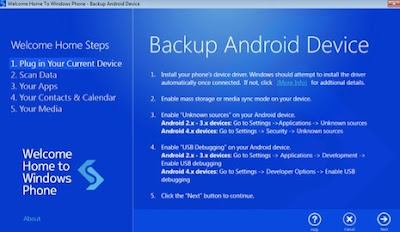
    • Launch the application and simply plug in your smartphone and wait until all the drivers are installed
Download "Welcome Home
Screenshot-2
    • Click "next" to begin the backup
Download "Welcome Home
Screenshot-3
  • Step 2
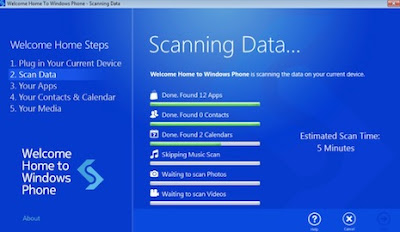
    • Scanning your contents started and wait until all the process completed
Download "Welcome Home
Screenshot-3
Download "Welcome Home
Screenshot-4
  • Step 3
    • See your apps recommendations and install the apps using the QR code.  To do this on your Lumia, from the homescreen, hit the magnifying glass in the lower right of the screen and touch the icon that looks like an eyeball. The code will scan and you can touch the link to be taken to the apps’ page in Marketplace.
Download "Welcome Home
Screenshot-5
  • Step 4
    • Enter your Live ID Account and click "Sign In" to continue the process
Download "Welcome Home
Screenshot-6
  • Step 5
    • All the contents will be transferred to your brand new Nokia Lumia
Download "Welcome Home
Screenshot-7
Post Source

Tips:Don’t Forget To Comment Below On The Comment Box, Because Your Feedback Will Help Us To Fix If Any Bug Stay Here. Thanks
Move Your Smartphone Contents to Nokia Lumia Through "Welcome Home" Available For Windows/Mac-OS
Rating: 910109 user reviews.

Friday, July 19, 2013

Nokia Lumia Windows Phone 8 Firmware Update Easily Through Zune Software

Nokia Lumia
Nokia Lumia Phone
Hey buddy’s hope you all will be happy to read the post, Here is a simple guide to update your Nokia Lumia Windows Phone by using Zune application from Microsoft.

The updating is simple as on Nokia Suite. Just only need a few step to updating your Nokia Lumia Windows Phone software.
All you need is Computer, Zune software, Nokia Windows Phone and also The USB Cable.


What you need to do before updating

  1. Download & Install Zune Software 
  2. Make sure that your date & time on your phone is correct.
  3. Make sure you are already fully charged your phone before updating.
  4. Make some room on your phone for the update. 
  5. If necessary, remove a few unwanted applications or other large items. To see how much free space you have on your phone, select Start, then flick left to the Applications list, choose Settings > About and look at the number to the right of Available storage.
  6. Free up space on your computer as you will need some room to download the software update, to save a backup of your existing phone software and settings and possibly to synchronise media files from your phone to your computer.

Lumia Update
Update Your Phone

How to update your Nokia Lumia Windows Phone?
  1. Download & Install the Zune software (Windows) or Windows Phone 7 Connector (Mac OS) on your computer.
  2. Connect your phone to your computer, using the USB cable.
  3. The Zune software will automatically run after your phone connected with your Computer. If not, run manually.
  4. In the Zune software, click Update Now (in Windows Phone 7 Connector for Mac, click Install Updates). 
  5. Ready to Update
  6. Make sure you keep your phone connected to your computer until you see a notification that the update is complete.
Tips:Don’t Forget To Comment Below On The Comment Box, Because Your Feedback Will Help Us To Fix If Any Bug Stay Here. Thanks
Nokia Lumia Windows Phone 8 Firmware Update Easily Through Zune Software
Rating: 910109 user reviews.