Pages

Showing posts with label Check. Show all posts

Thursday, August 1, 2013

Nokia Beta Labs just released "Lumia Storage Check"

Lumia Storage Check
Lumia Storage Check


Nokia Beta Labs just released "Lumia Storage Check" beta application for Nokia Lumia with Windows Phone 8.
This beta version is an update version of "Lumia Storage Check" that comes with new firmware update for Nokia Lumia 920, 820 and 620. There are some new features on this beta version including "Manage Maps", "Video shown separately", etc.
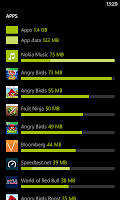
  • "Lumia Storage Check beta can be used to show a detailed breakdown of the phone memory usage and do something about it. The app shows you an overview and details on the second page."
Features
  • Apps - with app data included and sorted by size on further detail page
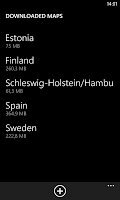
  • NEW: Maps - you can now manage maps from here and store them on SD card
  • Temporary files - temp files created by the system, some of which can be deleted with the
  • Photos Storage Information
  • Music Storage Information
  • NEW: Videos shown separately
  • Office docs (including OneNote notebooks, copies of docs accessed from SharePoint and SkyDrive)
  • Email+contacts Storage Information
  • Ringtones Storage Information
  • System (fixed, usually 1.9 GB)
  • Other (this includes stuff that user has little control over)
Lumia Storage Check     Lumia Storage Check     Lumia Storage Check


Minimum firmware required 
  1. Lumia 820 or Lumia 920: 1232.5957.1308.0000 and higher
  2. Lumia 920T: 2041.0009.1308.1002 and higher
  3. Lumia 520, Lumia 620 or Lumia 720: 1030.6407.1308.0000 and higher
Lumia Storage Check        Lumia Storage Check

Note
  • The storage check app here in Nokia Beta Labs is offered as a stand-alone app (not under settings) 
Download

Tips:Don’t Forget To Comment Below On The Comment Box, Because Your Feedback Will Help Us To Fix If Any Bug Stay Here. Thanks.
Nokia Beta Labs just released "Lumia Storage Check"
Rating: 910109 user reviews.

Sunday, July 28, 2013

How To Check & Download Software Update on Your Nokia Lumia Windows 8 Phone

Nokia Update
Nokia Update


Software update for Nokia Lumia with Windows Phone 8 will brings some new features, enhancements, bug fixes, performances improvement and more.
To check, download and install the software update for your Nokia Lumia with Windows Phone 8, you can check & download the update directly from your Nokia Lumia Windows Phone 8.
In this post, we will inform you about "how to" check and download the software update for your Nokia Lumia with Windows Phone 8.

Step 1: Preparation
  1. Make sure date & time are set correctly on your Nokia Lumia Windows Phone 8
  2. Make sure your remaining battery life is more than 50%
  3. Make sure that there are no download & installation progress on Windows Phone Store
  4. Make sure you are connected to WiFi network with sufficient speed
  5. Make sure you are already close all applications
Step 2: Download & Install
  1. Go to Setting > phone update
  2. Tap "check for updates" to check the update is available or not
  3. If the update is available, Continue to update/downloading the update
  4. The download progress will start
  5. After done with download progress, Tap "install" and your Nokia Lumia will restart to start the update process
  6. The "gear" image will appear, just wait until the process is finish
  7. After that, there are some remaining steps like "moving your data", etc. Just follow the steps
  8. Done, Your Nokia Lumia Windows Phone 8 is up to date with current Software version

How To Check & Download Software Update on Your Nokia Lumia Windows 8 Phone
Rating: 910109 user reviews.