Pages

Showing posts with label Post. Show all posts

Tuesday, September 10, 2013

How To Show Any Ads Between Below & Avobe The Every Post On Blogspot Blog

How To Show Any Ads Between Below & Avobe The Every Post On Blogspot Blog

Show Ads Between Below & Avobe The Every Post On Blogspot Blog

Article Writer: Rajib Khaja
Category: Tutorials, Blogspot Blogger
Must Read The Full Post Before Download & Install


Hi dear Blogger I know why you comes and reading the post here that is nothing more except you want to show Html/JavaScript ads between below and after the all blogspot blog post automatically on ur blog if it is? Then you’re on the right place & you no need to feel worried anymore I will show you how to place any kind of ads including Adsense Ads just read the whole post below I written for you.

Why ads below the post title & end of the post?

Because it is the position with the highest CTR (click-through rate). In other words the ad placed there will bring in the most money. According to the Adsense ads positioning guideline published by Google, the best performing Adsense ad position is above the primary content i.e. above the blog post, as illustrated by the heat map.

Placing an ad below post title (above post content) is a not at all difficult. All you have to do is create an ad unit on Google Adsense website, get the code and add it to the specified location in your blog template.

(You can’t use Blogger’s Inline Adsense or Adsense gadget because it doesn’t have the option to add an ad under post title).

Follow The Instruction Below to Adding the ad code to the template
  1. Go to Blogger then Click Template > Edit HTML, it will show you an HTML editor seems like notepad/frontpage or if you’re a blogger then already you know about that.
  2. First Backup your templates because if you mistake during editing then so that you may back to your original templates,
  3. Click anywhere inside of the editor then press Ctrl+F key then it will show you a search box inside of the new blogspot template editor then copy this code <data:post.body/> & paste on the search box under the blogspot templates editor then hit Enter, it will show you 3-4 same code but you just look for second code like,
<b:if cond='data:blog.pageType == &quot;item&quot;'>
Put The Ad Code Here
    <data:post.body/>
Put The Ad Code Here
<b:else/>
    <b:if cond='data:blog.pageType == &quot;static_page&quot;'>
        <data:post.body/>
How To Show Any Ads Between Below & Below The Post On Blogspot Blog
Screenshot Click To Large
  •  You're almost Done Just Save the templatese & open any post to checkout the work was 100% okey or not.
Tips: Don’t Forget To Comment Below On The Comment Box, Because Your Feedback Will Help Us To Fix If Any Bug Stay Here. Thanks.
How To Show Any Ads Between Below & Avobe The Every Post On Blogspot Blog
Rating: 910109 user reviews.

Tuesday, August 13, 2013

Download Post Apocalyptic Mayhem-PROPHET

Post Apocalyptic Mayhem-PROPHET
Release Date: 04-2014
Language: English | French | German | Italian | Spanish
 Polish | Russian | Japanese
Mirrors: PutLocker | UPaFile | Filewinds | BillionUploads

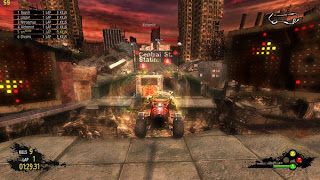
Free download PC game Post Apocalyptic Mayhem Full Version - lets you race and battle heavily-modified vehicles through numerous breathtaking tracks and lay waste to other racers in over-the-top vehicular mayhem. You can use special vehicle abilities to cause spectacular destruction to enemy cars as you fight and speed to victory. You’ll experience remarkable speeds, hilarious and violent weapons, reinforced vehicles and various exhilarating tracks.

Note: This version includes the vehicles: Kitty, Nucloid and the Veteran and tracks: Death Area 8, Airplane Cemetery and Abandoned Sawmill. Also it includes the Chaos Pack DLC. Game version is 1.03.272.


Post Apocalyptic Mayhem-PROPHET
Screenshot - 1
Post Apocalyptic Mayhem-PROPHET
Screenshot -  2
Post Apocalyptic Mayhem-PROPHET
Screenshot -  3
Post Apocalyptic Mayhem-PROPHET
Screenshot -  4
Post Apocalyptic Mayhem-PROPHET
Screenshot -  5
Minimum System Requirements
  1. OS: Windows XP/Vista/7
  2. Processor: Intel Pentium 4 @ 3.0 GHz / AMD Athlon 64 3200+
  3. Memory: 1 Gb
  4. Hard Drive: 1 Gb free
  5. Video Memory: 256 Mb
  6. Video Card: nVidia GeForce 6800 / ATI Radeon X1800
  7. Sound Card: DirectX Compatible
  8. DirectX: 9.0c
  9. Keyboard
  10. Mouse

Click The Link Below To Download

Mirror via PutLocker
Mirror via UPaFile
Mirror via Filewinds
Mirror via BillionUploads
Password: koskomputer.blogspot.com

How To Install

  1. Unpack, burn or mount
  2. Install the game
  3. Copy the cracked content from PROPHET directory
  4. Go To Hell!
Information

  1. PL, UPa, FW, BU Interchangeable Links
  2. Total part: 4 / 250 MB
  3. Total file : 864 MB
Tips:Don’t Forget To Comment Below On The Comment Box, Because Your Feedback Will Help Us To Fix If Any Bug Stay Here. Thanks.
Download Post Apocalyptic Mayhem-PROPHET
Rating: 910109 user reviews.
Title Post: Download Post Apocalyptic Mayhem-PROPHET Updated at: 5:53 AM

Thursday, July 18, 2013

How To Show Ads Before And After The Post On Blogspot Blog

Ads

Ad Screenshot Above


After searching online two day I got the solution that how to you showing any kind of ads on blogspot/blogger blog. I will share with you how to place your ads below the post header and end of the post. That is also a very good place to get more clicks. So before installing the code you have to use an ad parser to convert the ad code. Now go for placing your ads below post title just follow the below steps.

Ads Example: <div class="separator" style="clear: both; text-align: center;">
<a href="http://goo.gl/nZGsn"><img class="alignleft size-full wp-image-59" alt="" src="https://blogger.googleusercontent.com/img/b/R29vZ2xl/AVvXsEgnBkmheR0mVIvkHmdWYux8_4gGFBwuu0v2WTLhePfUUlhDRdEMbOnA8N0CAb4RAGIRMeAti0pb6Yy29QN0_HHsy_Cv54ww6TyHTZjTWqWdck10QlN2wW4b3OCKBTObyr2vOthTBNe4unI/s1600/3.png" /></a></div>

Step 1:Log in to your blogger account and Click on Template ->Edit HTML-> Proceed


Step 2:Now click on Check box to expand the templates


Step 3:Now find <data:post.body/> by pressing Ctrl + F

  • Note: You will find 3/4 time this code go for second one.

Step 4:Now Paste your created ads code below/after the following code

    <data:post.body/>

Now check your site and see the ads. Happy Blogging. If you face any problem just leave a message below.


Tips:Don’t Forget To Comment Below On The Comment Box, Because Your Feedback Will Help Us To Fix If Any Bug Stay Here. Thanks.
How To Show Ads Before And After The Post On Blogspot Blog
Rating: 910109 user reviews.